KNX project recovery
Get your KNX project back from an ETS folder backup – with the same addresses, names and parameters
ETS says “The Project was not imported on this computer.” or “The project integrity is corrupted.”? From a backup of your ETS folders we rebuild the project with the same group addresses, parameters and links and deliver it as a .knxproj file.
Project analysis: EUR 97, included in the service price.
The service is provided by SMARTech – KNX experience since 1998.
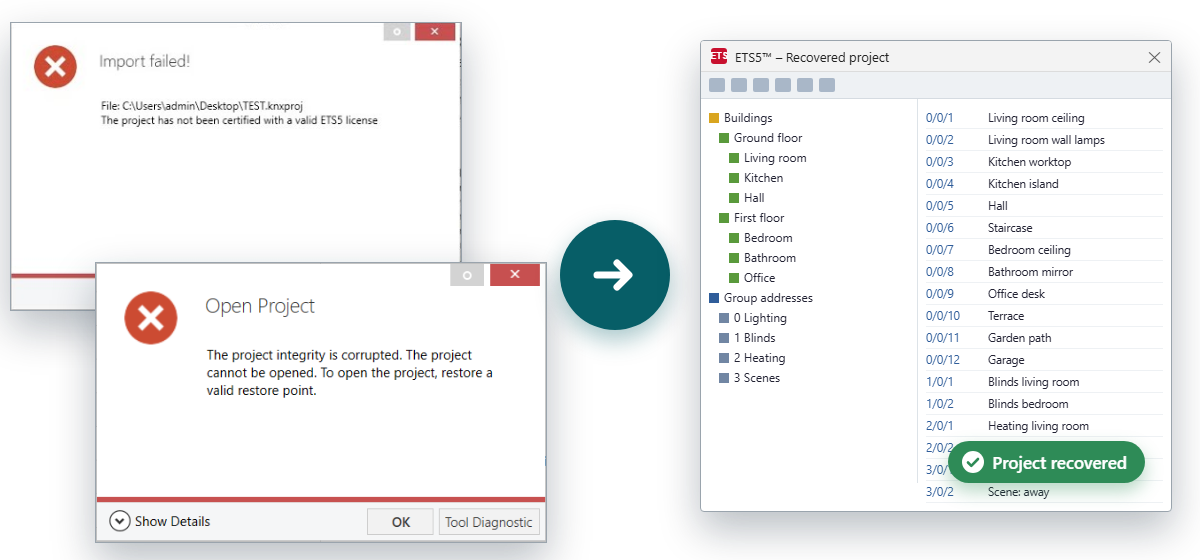
How this usually happens
Windows stopped working
After a system failure ETS was reinstalled and the project folder was copied back from a backup. The projects are listed, but none of them opens.
The laptop was lost or the disk failed
All that is left is a backup of the ETS folders: projects, restore points and the product catalogue. The last .knxproj export is years old or missing.
A new computer in the office
The project folder was moved instead of exported. On the new computer ETS shows the projects as not imported.
A project from a previous integrator
You received a copy of the folders instead of a .knxproj file and now want to change the installation.
Today
You have a copy of the ETS folders, but ETS will not open it. The building works, and you want to be able to change it freely again.
After
You import the .knxproj file and see the whole project: devices, group addresses, buildings, rooms and parameters. You also get a report showing how each device matches the backup.
ETS messages we recover projects from
This is how ETS tells you it will not open or import a project. Each of these messages is our starting point: from your ETS folder backup we rebuild a project that opens again.
The Project was not imported on this computer.
In the German ETS: Das Projekt wurde nicht auf diesem PC importiert.
We rebuild the project from the copied ETS folder as a .knxproj file you can import on the new computer.
The project integrity is corrupted. The project cannot be opened. To open the project, restore a valid restore point.
In the German ETS: Die Projektintegrität ist beschädigt, das Projekt kann nicht geöffnet werden. Um das Projekt wieder öffnen zu können, benutzen Sie bitte einen gültigen Wiederherstellungspunkt.
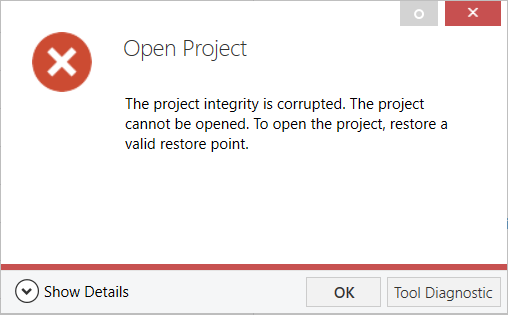
We rebuild the project from the data stored in the backup, even when no restore point opens.
Your project contains incorrectly structured data. Please contact KNX support for help getting your project repaired.
In the German ETS: Ihr Projekt enthält fehlerhaft strukturierte Daten. Bitte kontaktieren Sie den KNX Support um Hilfe zur Reparatur Ihres Projektes zu erhalten.
We rebuild the project as a new .knxproj file that ETS accepts on import.
The project has not been certified with a valid ETS5 license
In the German ETS: Dieses Projekt wurde nicht mit einer gültigen ETS5-Lizenz zertifiziert.
You get the project back as a new .knxproj file, ready to import into your ETS.
Import failed!
In the German ETS: Import fehlgeschlagen!
We find what stopped the import and deliver a project that loads.
There are device marked as defect. This is most likely caused by plug-in errors during import.
In the German ETS: Es existieren Geräte, die als defekt markiert wurden. Die Ursache hierfür ist zumeist ein Fehler eines Plug-ins während des Imports.
We run the manufacturers' plug-ins and carry their settings over from the backup, as we did for Berker B.IQ and ABB ABL/S.
The following products require an update of their product information. Please consult the manufacturer's website and re-import the original products:
In the German ETS: Die folgenden Produkte benötigen eine Aktualisierung ihrer Produktinformationen. Bitte laden Sie von der Website des Herstellers aktuelle Produktdatenbanken und re-importieren Sie die Produkte:
We find the product databases from the manufacturers and match the application versions in the backup.
Error reading Cdi16aDllName
We cleared this plug-in error in a rebuilt project and the B.IQ push-button settings came back from the backup.
Token StartElement in state EndRootElement would result in an invalid XML document. Make sure that the ConformanceLevel setting is set to ConformanceLevel.Fragment or ConformanceLevel.Auto if you want to write an XML fragment.
We rebuild a project with this error from the data stored in the backup.
Message text as shown in ETS5 5.7.7 (English and German), in the Berker B.IQ plug-in and in ETS 5.7.2. If you see a different message, add it in the form.
What we rebuild
- group addresses, including projects with more than 1,500,
- devices with parameters and communication object links,
- names of group addresses, devices and rooms, exactly as they were in the project,
- buildings, floors and rooms,
- settings stored in manufacturer plug-ins, such as logic modules and room controllers with displays.
Examples of devices we have rebuilt
| Manufacturer | Device | Order no. |
|---|---|---|
| Berker | B.IQ push button 3-gang with room temperature controller and display (plug-in settings) | 7566359x |
| Berker | B.IQ IR push button 3-gang with room temperature controller and display | 7566369x |
| ABB | ABL/S 2.1 Application Unit Logic: logic with 155 links, gates and timers | 2CDG 110 073 R0011 |
| ABB | LM/S 1.1 logic module | GH Q631 0080 R0111 |
| ABB | SA/S, JRA/S and JA/S actuators, dimmers, BE/S and UK/S inputs, US/U interfaces | 2CDG 110 …, GH Q631 … |
| Busch-Jaeger | triton push buttons 6324, 6326-101 and 6327 with thermostat, 6132 motion sensors | 6327-.. |
| Schneider / Merten | switch/blind actuator REG-K/12x/24x/10 | MTN649912 |
| Jung | push-button module 4094 TSM, room controller display RCD 4092 M, fan coil actuators | 4094TSM, RCD4092M |
| Viessmann | Vitogate 200 KNX | Z012827 |
| Intesis | Fujitsu air conditioning interface | FJ-RC-KNX-1i |
| Steinel, Elsner, Theben, Siemens | presence detectors, weather stations, temperature and air quality sensors, heating actuators | e.g. 70184, 70161, 1329201 |
What it costs on the market
- Rebuilding a project on site by reading out the devices in the building: typically around EUR 5,000 net and a week of integrator work for a house of about 150 m² (source).
- Software for reading out devices: EUR 495–595 net plus on-site work, and names, descriptions and room structure have to be added again (source).
With us you start with an analysis for EUR 97, fully credited towards the service. Your project comes back from the folder backup, with names, building structure and parameters, without a site visit.
How we work together
- Your details and the analysis fee. You fill in the form below, add a link to a ZIP file with the backup and pay the analysis fee: EUR 97.
- Analysis report and price. We check the backup and send you a report: which projects are in the backup, how many devices and group addresses they have, a list of devices with addresses, names and rooms, and which of them we can rebuild completely. The report comes with a file of each project’s group addresses, ready to import into ETS. We also give you the time and price of the full service.
- Deposit. You pay half of the service price. If it turns out that something cannot be rebuilt, you can get the deposit back.
- Rebuilding the project. If the work turns out larger than the analysis showed, we quote a new price. You can accept it or stay with the first price; in that case we may withdraw and refund the full deposit.
- Balance payment. When the project is ready, you pay the remaining amount.
- Files. We send the .knxproj file and the report comparing it with the backup.
The analysis fee is non-refundable, but it is included in the service price.
What to put in the ZIP file
- the ETS project folder with P-xxxx subfolders (in ETS5 by default C:\ProgramData\KNX\ETS5\ProjectStore); this is the minimum,
- if available: the ETS product catalogue (in ETS5 by default C:\ProgramData\KNX\ETS5\ProductStore),
- if available: device plug-in folders (e.g. the touch panel configuration program),
- if available: product database installers (.knxprod, .vd1–.vd5, .pr3 files),
- if available: any .knxproj export, even an old one.
Share the file through any cloud drive (Dropbox, Google Drive, OneDrive, WeTransfer) and paste the link into the form.
Good to know before ordering
- We rebuild the project as a new ETS project based on your backup, in line with the ETS rules.
- We need the project password, if one was set, and your confirmation that you are entitled to the project.
- Application versions come from the manufacturers’ databases. When an exact version is no longer available, we propose the closest compatible one and describe the differences.
- Plug-in devices (logic, panels, controllers with their own program) are rebuilt when the manufacturer’s plug-in works and its installer is available.
- You receive a project matching the backup. Programming devices on site is not included; before a full download it is worth testing one device.
- We rebuild the state stored in the backup. Changes downloaded to devices later and missing from the backup will not be in the project.
- Together with the project you get a report of what matches completely, what we replaced and what could not be rebuilt.
Frequently asked questions
What should I do when ETS shows “The Project was not imported on this computer.”?
Put the ProjectStore folder from your backup into a ZIP file and order an analysis. We rebuild the project as a .knxproj file you can import into ETS on the new computer.
Do you need to visit the building?
No. We work on the backup of your ETS folders, which you share as a link to a ZIP file.
What do I get after the analysis?
A report listing the projects, devices and group addresses in your backup, plus a file with each project’s group addresses, ready to import into ETS. You keep them even if you do not order the rebuild.
Order a project analysis
After sending the form you go to the EUR 97 payment. We send the analysis result to your e-mail.